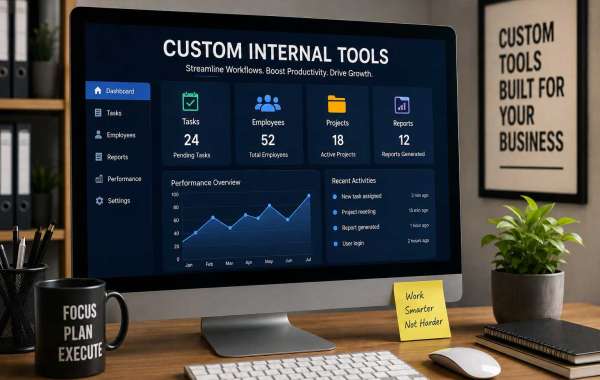

Businesses rely on technology for almost every aspect of their daily operations. While popular software solutions can handle many common requirements, they do not always fit the specific workflows of every organization. This is where custom internal tools become valuable.
Custom internal tools are software applications created specifically for a company’s internal processes. They can help employees manage information, automate repetitive tasks, communicate more effectively, monitor performance, and reduce operational errors. Instead of forcing a business to adapt to generic software, custom tools allow technology to adapt to the business.
What Are Custom Internal Tools?
Custom internal tools are software solutions designed for use within an organization rather than for public customers. They are built around the company's particular requirements, processes, and objectives.
For example, a company might develop an internal tool for:
Employee task management
Sales tracking
Inventory management
Customer data organization
Automated reporting
Project management
HR processes
Data analysis
Document management
Workflow automation
These tools can be simple dashboards or sophisticated applications connected to multiple business systems.
Why Businesses Need Custom Internal Tools
Every organization has unique processes. Generic software may provide useful features, but businesses often end up using spreadsheets, emails, messaging applications, and multiple disconnected platforms to complete one workflow.
Custom internal tools can bring these processes together in one centralized system.
For example, instead of employees manually collecting information from several spreadsheets and preparing reports every week, an internal dashboard can automatically collect the required information and generate reports.
This saves time and allows employees to focus on more valuable activities.
Key Benefits of Custom Internal Tools
1. Improved Productivity
One of the biggest advantages is increased employee productivity. Custom tools can automate repetitive activities and simplify complicated workflows.
Employees spend less time performing manual tasks and more time focusing on important business objectives.
2. Workflow Automation
Many internal processes involve repetitive actions such as entering data, sending notifications, generating reports, or updating records.
A custom tool can automate these activities, reducing unnecessary manual work and speeding up operations.
3. Better Data Management
Businesses generate large amounts of information every day. Managing that information through spreadsheets and separate applications can become difficult.
A custom internal system can organize important data in one location, making it easier for authorized employees to access, update, and analyze information.
4. Fewer Human Errors
Manual data entry and repetitive processes can lead to mistakes. Automation reduces the number of manual steps involved in a workflow.
As a result, businesses can improve data accuracy and maintain more consistent processes.
5. Better Team Collaboration
Internal tools can provide employees with a shared environment where they can access tasks, updates, documents, reports, and other information.
This can reduce communication gaps and help different departments work together more efficiently.
6. Scalability
A business may start with a small workflow but eventually grow. A custom internal tool can be designed with future expansion in mind.
New features, users, integrations, and workflows can be added as business requirements change.
Examples of Custom Internal Tools
There are many ways organizations can use custom internal software.
Internal Dashboards
A dashboard can display important business information in one place, including sales figures, website performance, employee productivity, or operational metrics.
Employee Management Systems
Companies can create internal platforms for managing employee information, tasks, attendance, onboarding, and performance-related workflows.
Automated Reporting Tools
Instead of manually preparing reports, businesses can create tools that collect data from different sources and automatically generate reports.
Inventory Management Tools
Companies dealing with physical products can use custom tools to monitor inventory levels, orders, suppliers, and stock movement.
Workflow Management Systems
A custom workflow platform can define specific steps for processes such as approvals, content publishing, customer onboarding, or internal requests.
Custom Tools vs. Off-the-Shelf Software
Off-the-shelf software is designed for a broad audience and can be useful when a company's requirements are standard.
Custom internal tools are different because they are designed around specific business needs.
The main difference is flexibility. With generic software, businesses may need to change their workflow to match the software. With custom development, the software can be designed around the existing workflow.
However, custom development can require a higher initial investment and ongoing maintenance. Therefore, businesses should evaluate their requirements before deciding which approach is best.
How to Build Custom Internal Tools
Creating an effective internal tool generally starts with understanding the business problem.
Step 1: Identify the Problem
Determine which process is slow, repetitive, expensive, or difficult to manage.
Step 2: Define Requirements
List the features employees actually need. Avoid adding unnecessary functionality that could make the system complicated.
Step 3: Plan the User Experience
The tool should be simple and easy for employees to understand. A complicated interface can reduce adoption even if the technology behind it is powerful.
Step 4: Choose the Technology
Depending on the requirements, developers may select web technologies, databases, APIs, cloud services, automation platforms, or artificial intelligence tools.
Step 5: Develop and Test
The application should be developed in stages and tested carefully before being introduced across the organization.
Step 6: Train Employees
Employees should understand how the new tool works and how it improves their daily tasks.
Step 7: Monitor and Improve
After launch, collect feedback and monitor performance. Improvements can then be made as business requirements evolve.
Security Considerations
Because internal tools may contain sensitive business information, security should be considered from the beginning.
Organizations should use appropriate authentication, authorization, access controls, secure data storage, backups, and monitoring. Employees should only have access to information required for their roles.
Regular security updates and maintenance are also important for long-term reliability.
The Role of AI in Custom Internal Tools
Artificial intelligence is increasingly being incorporated into internal business applications. AI can help employees search company information, summarize documents, analyze data, classify requests, generate reports, and automate certain workflows.
For example, an internal AI assistant could allow employees to ask questions about company policies or retrieve information from approved internal databases.
When implemented responsibly, AI can make custom internal tools more intelligent and useful.
Conclusion
Custom internal tools can help businesses create faster, more organized, and more efficient workflows. From automated reporting and employee management to data dashboards and AI-powered assistants, custom software can solve problems that generic applications may not address effectively.
The most successful internal tools are not necessarily the ones with the largest number of features. They are the ones that solve a clear business problem, are easy for employees to use, and can evolve as the organization grows.
For businesses dealing with repetitive processes, disconnected systems, or inefficient workflows, investing in a well-designed custom internal tool can be a practical step toward improving productivity and operational efficiency.